Autonomous Navigation using TurtleBot and ROS
Map Building, Localization, and Goal-Directed Navigation with a Mobile Robot
Abstract
This project presents the implementation of autonomous navigation on a TurtleBot platform using ROS. The system covers two core phases: building a 2D occupancy grid map of an unknown environment using gmapping and keyboard teleoperation, followed by autonomous, driverless goal navigation using AMCL-based localization. The approach demonstrates fundamental concepts in mobile robotics including odometry, localization, costmap-based path planning, and real-time obstacle avoidance.
1. Introduction
Autonomous navigation is a cornerstone capability for mobile robots operating in real-world environments. This project explores the ROS navigation stack on a TurtleBot, covering the complete pipeline from raw sensor data to goal-directed motion. Using the Astra depth sensor, the robot builds a probabilistic map of its surroundings and then localizes itself within that map to execute autonomous point-to-point navigation without any human intervention.
2. Key Concepts
- Odometry: Data gathered from moving sensors used to estimate the change in the robot's position over time, providing a relative position from the starting location.
- Occupancy Grid Map (OGM): A 2D map generated from 3D sensor data and the known robot pose. The environment is divided into an evenly-spaced grid where each cell holds a probabilistic value indicating the presence of obstacles.
- Localization: The process of determining the robot's current position relative to a known map using sensed environmental features.
- AMCL: Adaptive Monte Carlo Localization represents each possible robot position as a particle. Particles whose laser scans do not match the map are removed, converging on the robot's true location.
- Global Costmap: Keeps information for global navigation and path planning. Parameters are
stored in
global_costmap_params.yamlandcostmap_common_params.yaml. - Local Costmap: Keeps information for local navigation and real-time obstacle avoidance.
Parameters are stored in
local_costmap_params.yaml.
3. Methodology
3.1 Phase A — Building a Map
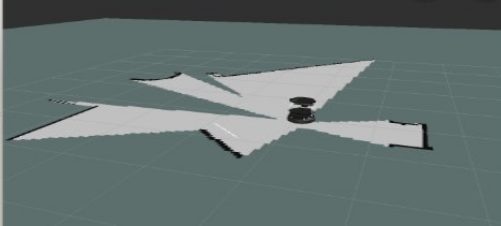
The robot is driven manually through the environment using keyboard teleoperation while gmapping builds an occupancy grid map in real time from Astra depth sensor data. Once the environment is fully explored, the map is saved to disk.
Terminal Window 1 — Minimal launch of TurtleBot
Terminal Window 2 — Launch gmapping
Terminal Window 3 — View navigation in RViz
If a map is not displayed, make sure the following display checkboxes are selected in the Displays panel:
- RobotModel
- LaserScan
- Map
- Global Map
- Local Map
- Amcl Particle Swarm
- Full Plan
Terminal Window 4 — Keyboard teleoperation
Drive the robot through the entire environment. When a complete map appears in RViz, save it without killing any prior processes.
Terminal Window 5 — Save the map
The process creates two files: my_map.yaml and my_map.pgm, placed in the TurtleBot netbook home directory.
3.2 Phase B — Autonomous Navigation with AMCL
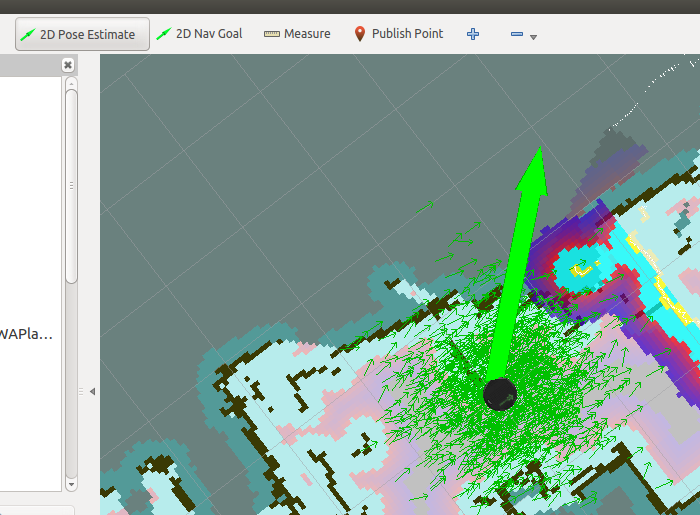
With the saved map loaded, AMCL localizes the robot by matching live laser scans against the map. The ROS navigation stack then plans and executes collision-free paths to user-specified goals entirely without human driving.
Terminal Window 1 — Minimal launch of TurtleBot
Terminal Window 2 — Launch AMCL with saved map
Terminal Window 3 — View navigation in RViz
3.3 RViz Control — Pose Initialization and Navigation Goals
When amcl_demo loads the map, TurtleBot does not yet know its current position on the map. Use RViz to initialize the pose estimate and send navigation goals:
Set Initial Pose Estimate
- Click the 2D Pose Estimate button in the RViz toolbar.
- Click the robot's physical location on the map.
- Drag the arrow in the direction the robot is currently facing.
Send Navigation Goal
- Click the 2D Nav Goal button in the RViz toolbar.
- Click the target destination on the map.
- Drag to set the desired heading when the robot arrives.
4. Results
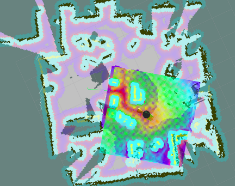
The system successfully demonstrated end-to-end autonomous navigation. The robot built an accurate occupancy grid map of the environment through manual teleoperation, then localized itself within that map using AMCL and navigated to multiple user-defined goals without collisions. The ROS navigation stack handled both global route planning and local obstacle avoidance reliably across all test scenarios.
5. Conclusion
This project demonstrated a complete autonomous navigation pipeline on a TurtleBot using ROS. Gmapping and AMCL together provide reliable map building and localization, while the ROS navigation stack handles global path planning and local obstacle avoidance. The system is readily extensible to larger environments, richer sensor configurations, and integration with higher-level task planners. Future work may explore dynamic obstacle handling, multi-floor navigation, and deployment in real-world logistics or facility management settings.